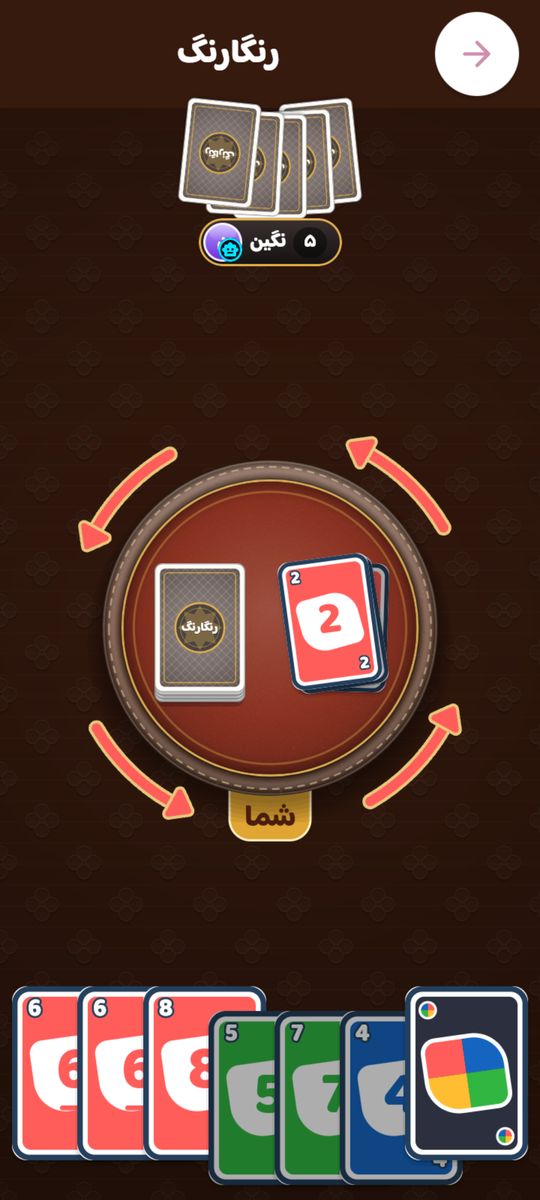
Color Cards (Rangarang in Persian) is Hamdor's fast, noisy shedding game, similar to UNO and the color-and-number games you know from family nights. The deck has four colors with numbers 0 to 9, action cards like Skip, Reverse and +2, and wilds that change the color. The rules take a minute, but when to spend an action card and which color to call turn it from luck into skill.
In Hamdor you can play Color Cards with two, three or four players, online against real players, in a private room with friends, or offline against bots.
How to play Color Cards
- Seven cards each. Play a card matching the top card's color, number or symbol.
- No match? Draw one card: play it if it fits, or keep it and pass.
- Skip skips the next player, Reverse turns play around (in two-player it acts as Skip), +2 makes the next player draw two and lose the turn.
- A wild changes the color. Wild +4 also makes the next player draw four, and may only be played when you hold no card of the current color.
- +2 and +4 do not stack. First to empty their hand wins.
These are the exact rules Hamdor plays by; the app shows them too, under each game's How to play tab.
Color Cards in Hamdor
- Seven cards each: the first card on the pile is always a number, so play starts with no special effect.
- Draw one: with no match, draw one card; play it if it fits, otherwise keep it and the turn passes.
- Wild +4 only when you're out of the color: the game enforces it, so there's no challenge to make.
- No stacking: +2 and +4 don't stack; the next player draws and loses the turn.
- Reverse with two players acts as Skip, so you go again.
- Two, three or four players, each playing for themselves. First to empty their hand wins.
Color Cards modes in Hamdor
- 2 players
- 3 players
- 4 players
Tips to win at Color Cards
- Save your wilds. A plain wild is always playable, so spend other cards first and keep the wild for when you're stuck.
- Call your longest color. When you play a wild, count your hand and name the color you hold most of.
- Switch color by number. If the current color is bad for you, play the same number in another color to steer the game your way.
- Chain action cards in two-player games. Skip, Reverse and +2 all bring the turn straight back to you, so a run of them can empty several cards in one turn.
- Aim action cards at the leader. When the next player is down to one or two cards, a +2 or a Skip is your best answer.
- Notice what rivals lack. If someone drew on a color, they probably don't hold it; call that color when you change.
Color Cards in Hamdor
- Online, ranked: play real opponents and earn a rating. If nobody turns up within a few seconds, a bot takes the seat and is labelled as a bot.
- Private rooms: create a room, send the code to your friends and chat with stickers and reactions while you play.
- Bots: play offline against bots, to practise or when nobody is online.
- Stats and streaks: your win rate, best winning streak and this game's leaderboard.
- Your own look: change how the table and pieces look in the Hamdor shop. It is cosmetic only and never affects who wins.
Color Cards FAQ
What is Color Cards?
A color-and-number card game: each turn, play a card matching the top card's color, number or symbol. First to empty their hand wins.
How many players?
Two to four, each for themselves. Bots fill any empty seats.
When can I play a Wild +4?
Only when you hold no card of the current color. It changes the color, and the next player draws four and loses the turn.
Do +2 cards stack?
No. In Hamdor, +2 and +4 never stack; the player hit draws the cards and the turn moves on.